An approval decision for a visitor is rarely made at a single moment. It builds up over the life of a visit: invites are modified as more details are gathered, different teams provide approvals based on the parts of a visit they’re responsible for, and guests are asked to fill in information that only they can provide. As more is uncovered, even the requirements for what needs to be asked, or who needs to approve, can change. And when someone later asks why a visitor was let in, the answer depends on all of it: who approved, what information they had at the time, and what changed afterward.
Consider a relatively simple approval policy: every visitor needs site security’s approval, and visitors requiring lab access also need approval from the lab manager.

Now say a host invites a contractor and initially indicates that they won’t need lab access. Site security approves the visit, and the contractor receives their pre-registration form. While filling it out, the contractor corrects the form and indicates that they actually do need lab access.
Starting the approval over would throw away work that’s still valid and make site security review the visit again, even though nothing relevant to their approval has changed. Ignoring the new information would let the visitor in without the lab manager’s approval. We needed something in between: keep what still holds, and redo only what the change affects.
This post covers how the engine behind Approval Workflows, the core of Envoy Visitors Critical, does that.
Why visitor approvals get complicated
Companies like defense contractors, labs, and data centers can’t simply let a visitor in upon a host’s request. Regulations such as ITAR and EAR impose strict requirements on access to sensitive technology and information, which can affect how compliance teams manage on-site visits. Under these requirements, compliance teams may need to collect information such as the companies a visitor works for, their citizenship, and identity documentation details. This information helps determine who must review the visit, whether the visitor is screened against various restricted-party lists, and whether they're denied entry or must be escorted. Approval Workflows lets compliance teams turn these requirements into approval policies using a graphical builder.
Building this engine presented a few challenges:
- Policies are not linear. They branch, rejoin, and execute independent steps in parallel.
- People are the bottleneck. Machines respond in milliseconds, but people can take hours or days to act.
- Information arrives over time. A host might create an invite with only some of the required details. Visitors fill in more during pre-registration, sometimes changing which approvals are needed.
- Decisions must be auditable. Compliance teams need to know who approved a visit, what information they had at the time, and what changed afterward.
Built on an event log
One of the first things we had to decide was how to keep track of everything happening in an approval workflow. Just knowing its current state isn't enough. We also need to know who approved a visit, what information was available when they approved it, and what happened afterward. And when new information changes approval requirements, we need that history to determine which earlier work is still valid.
Think of two ways to keep track of a workflow. With a single sheet of paper, you erase the old information and write down new information whenever something changes. With post-its, you write a new note whenever something happens and add it to the stack without changing earlier notes. You throw away your eraser.
We chose the second approach with event sourcing. The engine keeps an append-only log of events, and whenever it needs the current state of a workflow, it reconstructs that state by applying those events in order.
Every interaction with the workflow goes through the same process, whether it’s a host editing an invite, a compliance officer clicking Approve, or a receptionist modifying a visit. Each arrives as a new post-it. The engine reads through its existing stack to reconstruct the current state, then passes that state and the command to a reducer. The reducer determines what happens next, producing new events that are added to the stack.
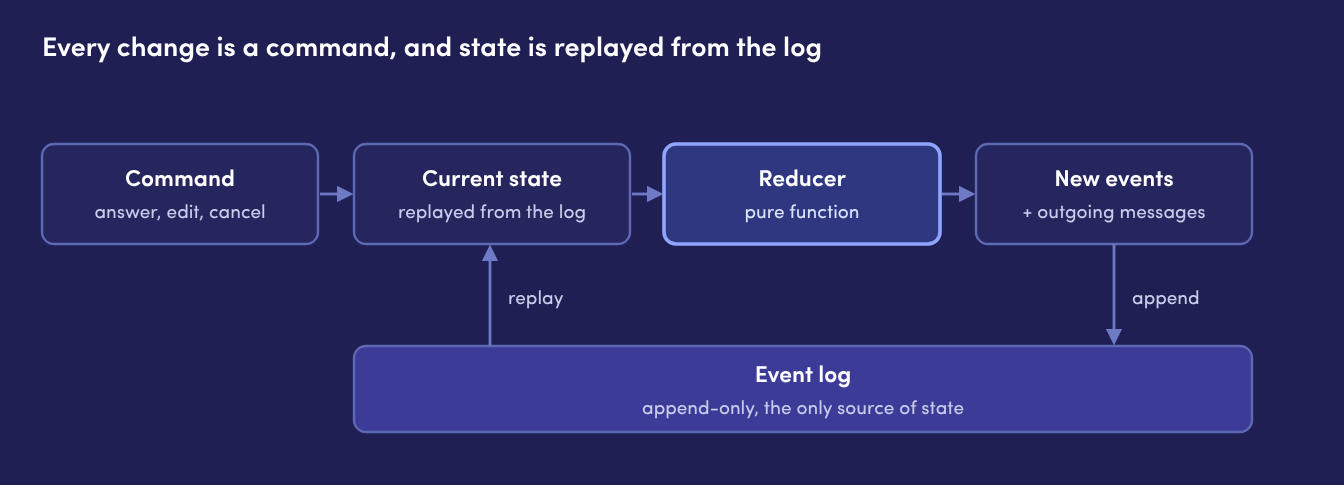
The reducer doesn’t execute any of these actions itself. It doesn’t write to the database, create approval tasks, or send emails. It just takes the current execution state, the workflow definition, and a command to determine the events and actions that should follow. The rest of the system handles those actions after the events have been saved.
That separation also gave us a way to perform dry-runs of policies without triggering outside services. For example, we sometimes need to know whether a visit would be approved automatically without actually starting an approval workflow. Rather than building a separate way to answer that question, we can run the real policy through the engine and simply discard the results. No events are saved, no tasks are created, and no emails go out.
Living with an event log
There are some consequences of building around an event log that we’ve had to live with:
- Old events have to stay readable forever. Changing an event's shape means supporting the old shape too. Because visits can be modified long after they are created, their approval workflows may be re-evaluated at any time. Changes to event schemas require careful handling with upcasts.
- Simple questions get expensive. With no table of current state in the workflow engine, "which visits are waiting on this team?" has to be answered from a separate copy of the data. Projections solve this problem, but they are another layer to maintain.
- Mistakes are fixed forward. Mistakes in the data are not corrected with DB updates. Fixes take effect with new runs and commands, and a mistake remains in history moving forward.
- It takes some getting used to. Most of us are accustomed to thinking in terms of database rows that get updated. Thinking in events instead takes some adjustment.
Re-evaluating a workflow
When something about a visit changes, we can't just carry on with the original workflow. The new information might necessitate different approvals, invalidate previous approvals, or introduce new questions that need to be answered. Yet completely starting over would throw away work that's already been done, including approvals from people who may not care about the changed details.
Instead the engine starts a new run of the same workflow, built from the old one. The old run remains in the event log untouched but auditable.
The new run does three things:
- Figures out what's affected. The engine knows which steps read which fields. It looks at the paths the previous run actually took and finds the earliest step on each path that reads a changed field. Steps before that point, along with any independent paths, aren’t affected.
- Reuses what's still valid. Unaffected steps get their earlier answers copied in, in the order those answers originally arrived. That preserves the results of earlier work without running those steps again. The order matters because parallel steps can write to the same field, and copying them in a different order could leave a different value behind.
- Keeps open approvals open. If a step is waiting on a person and the new run still reaches it, that step carries over as-is. The approver keeps the same task and never notices anything changed. If the approval is no longer needed, the old task is invalidated. Any late response is stored but ignored.
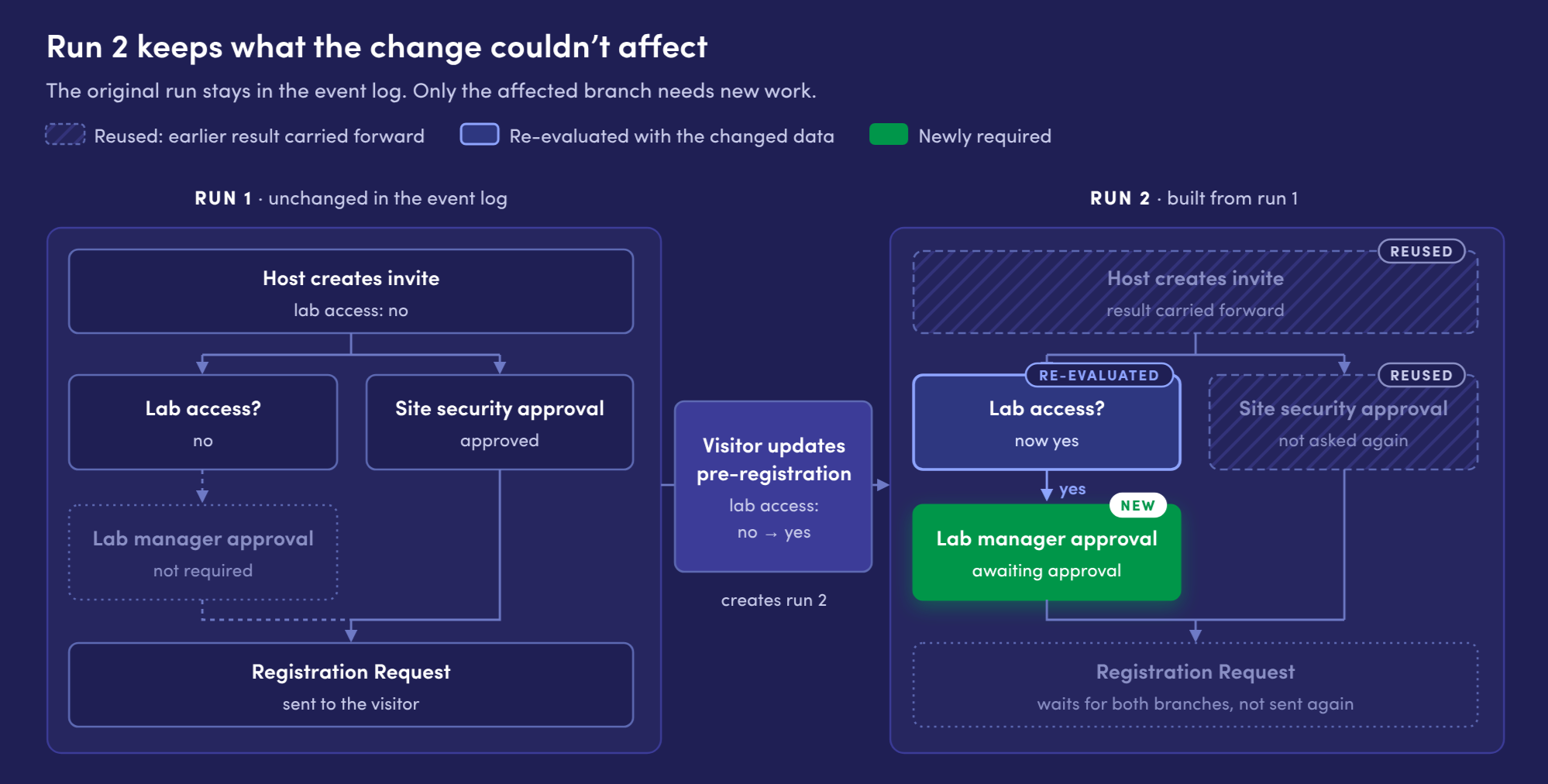
Back to our contractor: their pre-registration answer changes the result of the lab-access condition. The engine re-evaluates that branch and determines that the workflow now requires approval from the lab manager. Site security’s approval is on an independent branch that does not care about the lab-access answer, so it carries over unchanged.
The same process runs whether the change came from a host editing an invite, a visitor updating pre-registration, or someone signing in at a kiosk.
Replaying the graph after a change
Copying earlier answers into a new workflow run gets more complicated when a policy has concurrent branches. We must walk the policy graph again, preserving the original execution order while following new paths introduced by changed data.
The engine handles both of these requirements with a priority queue. Before replaying, it reads the previous run’s events from the log to get the order in which each step finished. That order sets each step’s priority, rather than the order the new traversal happens to reach them. Starting from the beginning of the workflow, the engine adds steps to the queue as their dependencies are satisfied, then processes them in priority order. The previous run decides priority, but the new run decides eligibility.
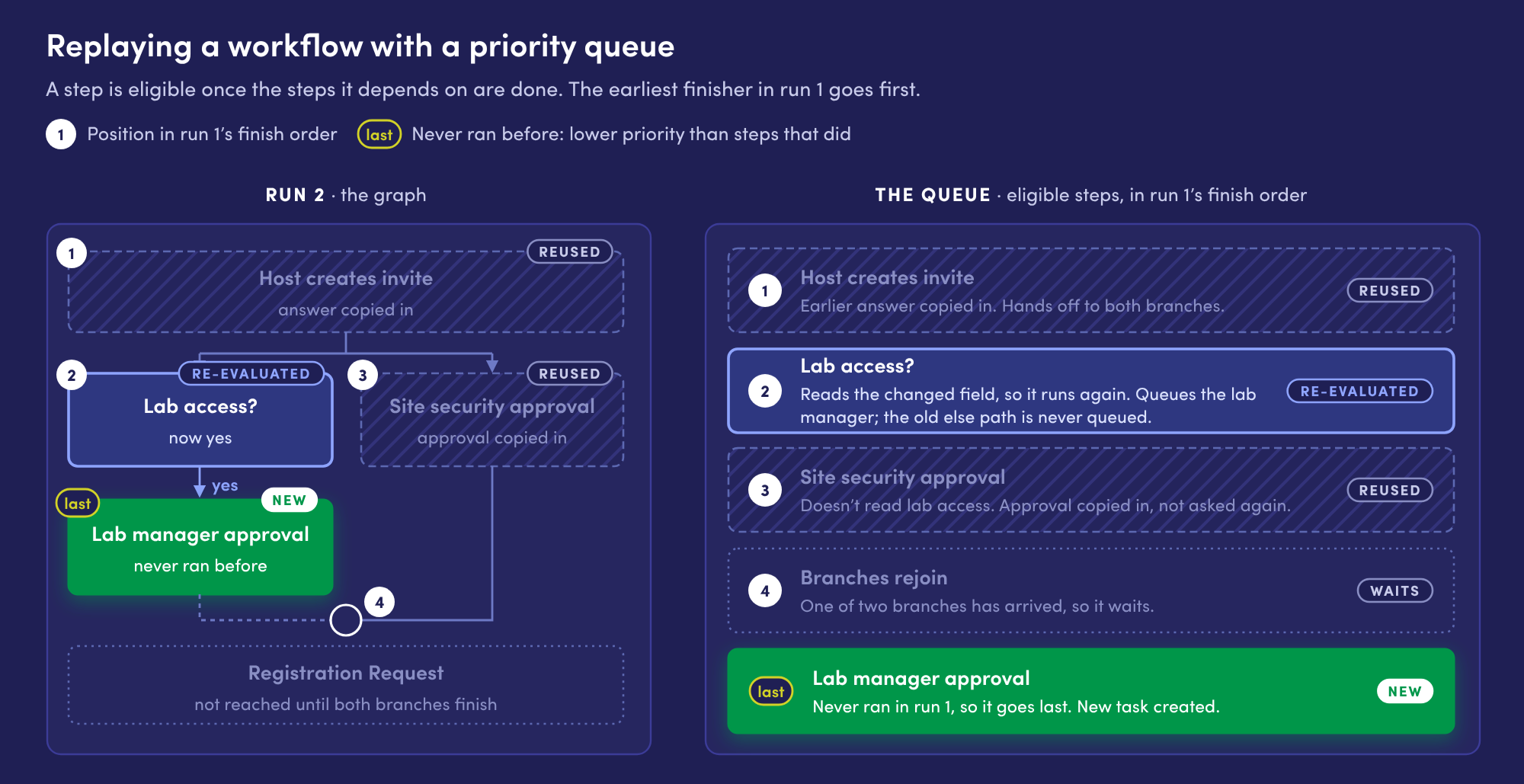
Steps can write to the same piece of workflow data, and when they do, the last one to finish wins. Replaying in the original order means the same step wins again. It also means the new run's history reads in the same order as the original, which makes the two easy to compare.
When a condition goes in a different direction, the engine follows that new branch instead of the old one. Steps on the old branch are never reached, so they’re never replayed. Since steps that never ran before have no place in the previous run’s order, they get lower priority than previously completed steps when both are eligible.
Event sourcing didn’t give us re-evaluation, but it made it buildable. The policy tells us which steps a change might affect. The log tells us what actually happened, and in what order.
Building Visitors Critical gave us a chance to dive deeper into the engineering challenges driven by our customers' compliance requirements. We've had a lot of fun working through them, and there's a lot more to build as we continue learning from our customers!
If problems like this sound fun to you as well, we're hiring!