
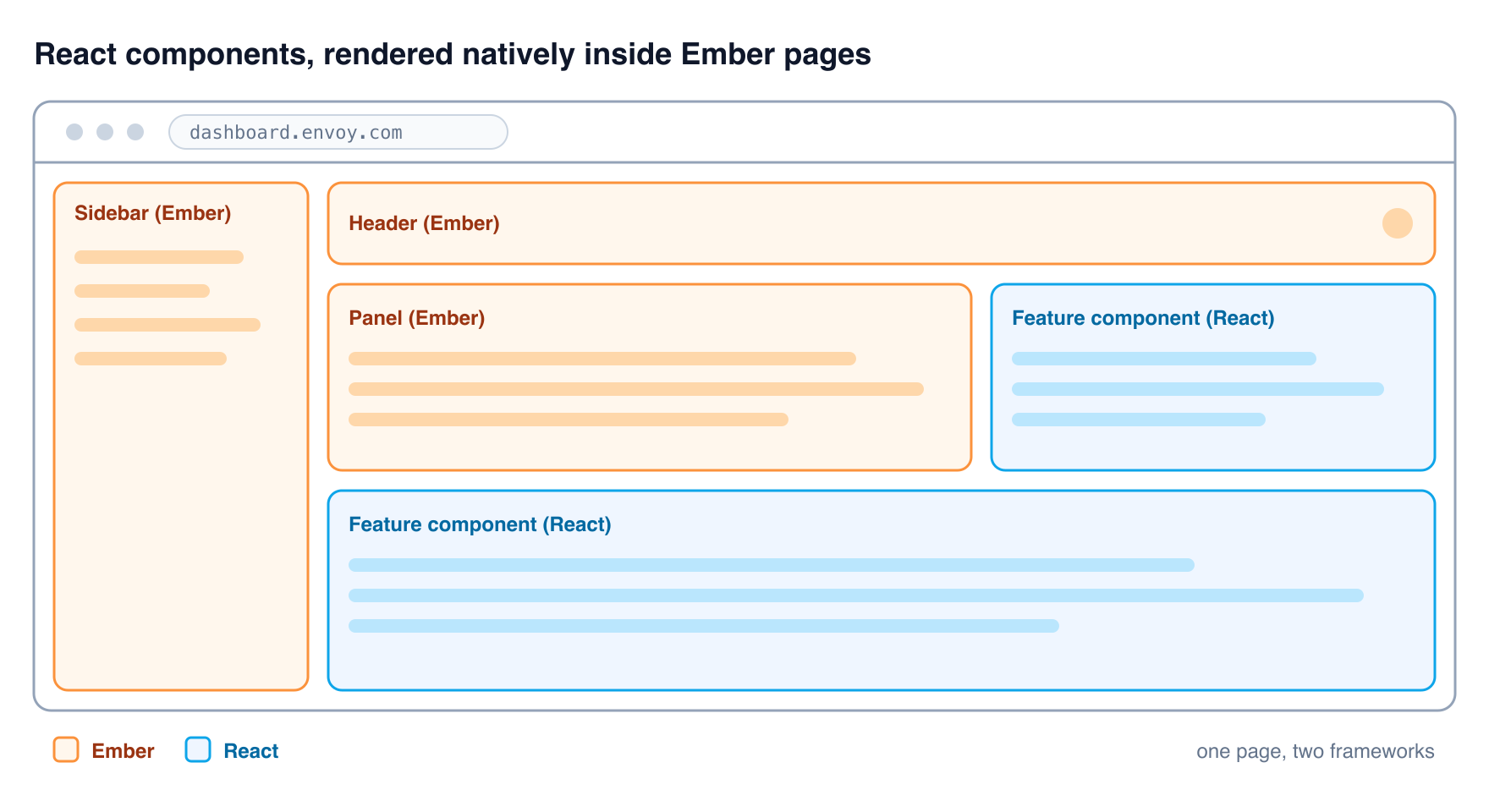
Any software company with significant history will have legacy codebases and Envoy is no different. Our admin dashboard is written in Ember.js and is a core part of our products, but Ember.js is aging and we want to move to something more modern. Logistically speaking, this is a hard problem. A full rewrite is not feasible, as we either have to fully commit to it which means no value being delivered to customers for multiple months or endure the maintenance nightmare of maintaining the existing app while developing its successor. So what if there was a better way?
I've spent over ten years working with JavaScript (and TypeScript) and if that time has taught me one thing, it's that JavaScript will let you do almost anything. Now this can get you into plenty of trouble, but it can also lead to unique opportunities to build great things. When we were first exploring a migration to React, I wasn't a fan of any of the ways we could have done it. They all came with significant drawbacks and I had a gut feeling we were missing something. And then an idea popped into my head: “What if we could just render React natively in Ember pages?” At face value, the idea seemed silly. It's easy to assume two frameworks simply can't be combined like that. But assumptions are always worth challenging and at Envoy, I've always had the space to explore interesting ideas that have the potential to raise the bar.
The journey
Before getting into the technical journey, it's worth being clear about what we were actually trying to achieve, because it was never “rewrite the dashboard in React”. While that is what we are doing in essence, it's much more than just a technical change. The objective was to improve three things: the velocity at which we deliver features to customers, the quality of what we ship and the experience of the developers building it. Ember was holding us back on all three, but so would any solution that wasn't able to deliver clear improvements to these values.
Framing it this way changes how you evaluate every decision, something that has become more and more important to me as I've grown in my career. I spend a lot of time thinking about the trade-offs between approaches based on what really matters for any given project. A technically elegant integration that makes day-to-day development slower is a bad trade. A migration strategy that produces beautiful React code but freezes feature delivery for months is another one. Whenever we hit a fork in the road, the question was never “which option is more technically impressive?” but “which option moves velocity, quality and developer experience forward?” That's what evolves a project from delivering “good enough” to something greater and is what we strive to do at Envoy. Every decision that follows was measured against these three things.
Native rendering
There are three key points that really make this idea of rendering React inside of Ember valid. Firstly, React is not a framework. This is an oft-criticized part of React, but React (specifically React, not Next.js) is really just a component rendering library. If you look at the bootstrapping done for a standard React app, it's literally just taking an existing HTML element on the page and telling React to render a component inside of it.
import { createRoot } from 'react-dom/client';

function App() {
  return <h1>Hello from React</h1>;
}

const root = createRoot(document.getElementById('root'));
root.render(<App />);
In a normal app, you're doing this on page load and then you live inside of that React application context, but there's no requirement to do that. You can render React applications anywhere, anytime and this aspect of the library is really powerful for our use case.
The second point is around DOM stability in Ember. Rendering a React application anywhere, anytime is only useful if Ember doesn't touch the HTML that React renders into the DOM. Luckily, almost all (if not all) modern web frameworks have very naturally stable DOMs because making changes to the DOM is an expensive operation and too much unnecessary DOM manipulation can quickly lead to performance problems. Ember is no different in this regard. Its rendering engine, Glimmer, only touches DOM nodes bound to tracked values, so a plain <code><div></code> with no bindings is guaranteed to never be re-rendered.
Lastly, React is just JavaScript. When you work with React normally, you work with JSX, which looks and feels a lot like HTML. But JSX is just syntactic sugar that is converted at build time into plain JavaScript. JSX elements are just function calls to React, props are a plain JavaScript object and callbacks are just plain functions. While we would normally use JSX, there's nothing stopping us from writing those plain JavaScript calls directly. This makes the integration fairly trivial — we don't even need to change the Ember build system to support JSX.
One small prototype later and we end up with something like this:
// React component
function App(props: { name: string }) {
  return React.createElement('h1', null, `Hello, ${props.name}!`);
}

// Ember component
export default class ReactHostComponent extends Component {
  private root?: Root;

  @action
  mountReactApp(element: HTMLElement): void {
    this.root = createRoot(element);
    this.root.render(React.createElement(App, { name: 'Ember' }));
  }

  @action
  unmountReactApp(): void {
    this.root?.unmount();
    this.root = undefined;
  }
}
<div {{did-insert this.mountReactApp}} {{will-destroy this.unmountReactApp}}></div>
Basic mounting of a React component inside of Ember.
Render the component in our Ember app and voilà, we have React rendering inside of Ember. You can pass data in via props, and even react to callbacks directly in Ember via functions decorated as actions.

At this point the conceptual pattern became a little clearer: the idea that we could expose feature-level components and render them anywhere on the page or even act as the whole page content. This keeps our product velocity high as it reduces friction and trade-offs. If you're developing a feature that adds a new widget on an existing page, build a feature component for it in React and just render it on the page alongside the existing Ember, no need to make the call whether it's worth rewriting the entire page in React or not and how that will affect the project delivery.
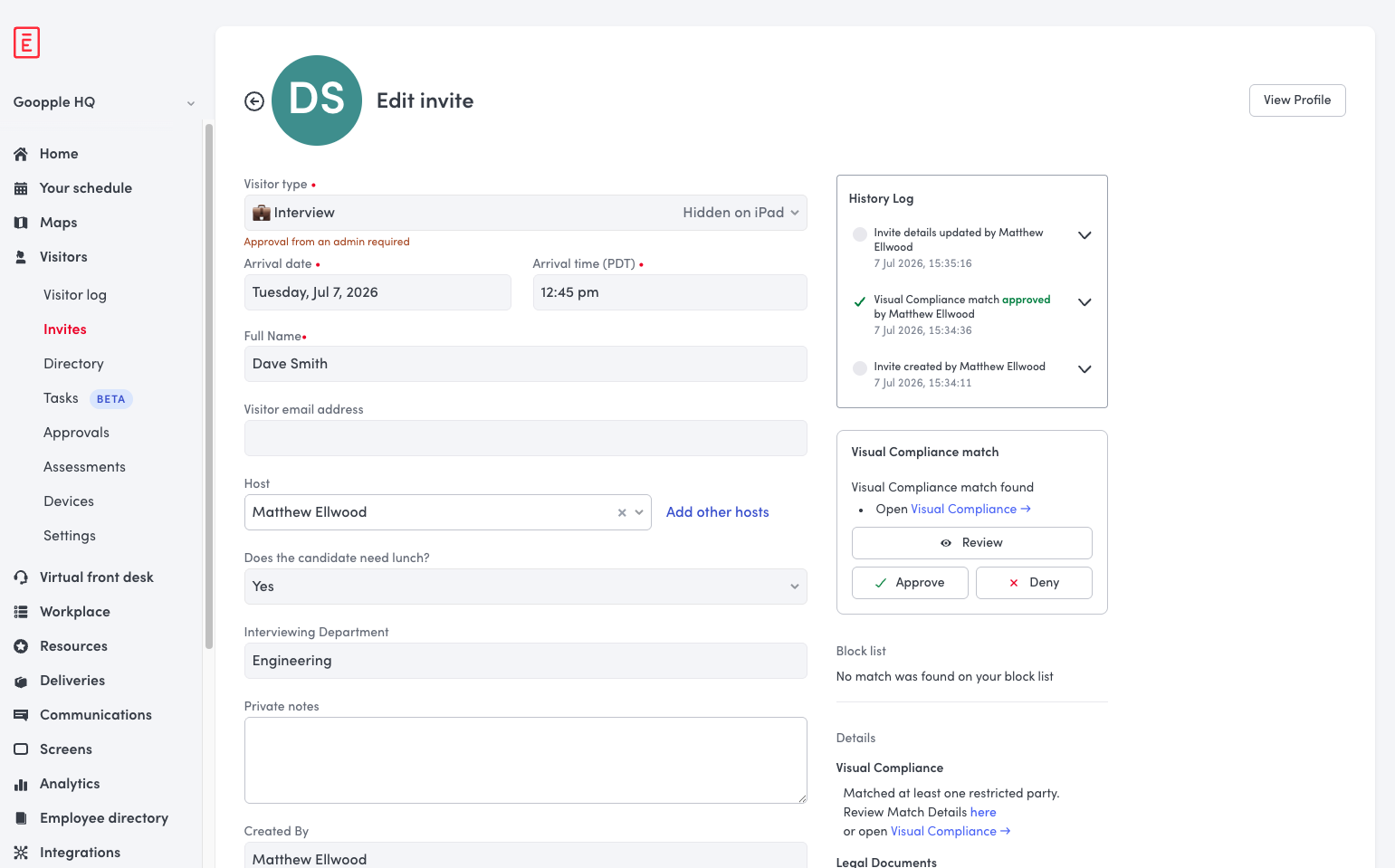
It is worth pointing out that, while we do have full integration from Ember to React, we want to minimize coupling between the two. A React component that is deeply coupled to the existing Ember components is no better than a native Ember component. Generally for our use cases, the only properties passed into the React components are ones that give context. For example, a component working in our Visitors system might take the ID of the logged-in user's company and the ID of the invite we are currently looking at, from which it then makes its own API calls. This keeps each integration point light, with minimal Ember-side plumbing.
But this is just the tip of the iceberg. While the prototype is interesting, it's completely unusable in actual development right now and we need to do a lot more work to get it to the point of providing real value to our team.
Repository structure and deployments
The obvious next step is to look at where our React components are going to live. There are some obvious problems with including them directly in our dashboard repo. Not having JSX support is great for integration, but suddenly becomes a problem when you actually try to write components. Also having a repo with a mixture of React and Ember is likely just going to lead to confusion and frustration, so it makes sense to pull the React components into their own repo.
Using a repo built on Vite, we can use Storybook and Mock Service Worker to support local development of components with a sub-second development loop and Hot Module Replacement built right in. This is great for developing components, but now we need to get them back into the dashboard to be used.
The first iteration of this was to publish the components as an npm package that could then be used as a dependency by the dashboard repo. This sounded sensible but came with some major problems. To deploy a change we needed to:
- Open a PR in the React repo
- Merge it
- Wait for the build system to publish the new version
- Open another PR in the Dashboard repo consuming the new version
- Merge it
- Wait for the dashboard to build so we can deploy it
This approach bogged us down in multi-repo deploys that were slow and cumbersome. Each change required a full CI build in the dashboard, even if the only thing changed was the package version and Ember builds are not quick. If we had adopted this approach long term our velocity would have been worse than just sticking with Ember, which would have defeated the entire purpose of what we're trying to achieve. This is especially true in today's AI-enabled world. We need a system that allows us to ship fast, not be a roadblock. Luckily we found a better, less coupled approach: Module Federation.
Module Federation is a plugin for Webpack/Rspack that allows an application to load JavaScript modules from a remote host at runtime (we use Vite for local development and Webpack for deployment builds). Not only does this mean we no longer need to maintain a dependency on the React repo in the dashboard, but in many cases we no longer need to care about the dashboard repo at all. We can actually deploy changes in the React repo without touching the dashboard repo. Every feature component that will be rendered in Ember is exposed in our Module Federation config. At runtime, all we need to do is import the component asynchronously and we will now have our feature component ready to be rendered:
 @action
  async mountReactApp(element: HTMLElement) {
    const { App } = await import('reactComponents/App');

    this.root = createRoot(element);
    this.root.render(React.createElement(App, { name: 'Ember' }));
  }
A one-line change to import a component via Module Federation at runtime.
This greatly simplifies the deployment process to the following Continuous Delivery model:
- Open a PR in the React repo
- Merge it
- Wait for the build system to build the artifacts and automatically push to staging for testing
- Promote the artifacts to production when ready
Now every time we promote the artifacts to production, those changes are propagated to users immediately without a dashboard deploy (Module Federation has automatic cache-busting). This allows the repo to follow the exact same trunk-based deployment process as every other Envoy repo, which is a big win. Setting up a new component requires a small amount of plumbing in Ember, but then that plumbing very rarely needs to be touched again.

Exposing cross-cutting concerns
So now we have feature components being pulled in remotely and rendered in Ember, but we want these components to function independently, which means having access to cross-cutting concerns like user authentication, error reporting, analytics and feature flags. We already have this functionality set up in Ember and there's no value in duplicating it, but we need to expose it to each feature component.
We solved this by adding a shared config object that uses thin interfaces for the cross-cutting concerns we want. This config object is also exposed via Module Federation to make it accessible to Ember. During the Ember bootstrap on page load the config is imported and the appropriate values are set to satisfy the interfaces. On the React side, we expose the functionality as a set of shared hooks, so a developer working on a feature needs no knowledge of how any of this works. The cool part about Module Federation is that the system is smart enough to return the same config object when imported locally in the React repo and when imported remotely in Ember, so it all just works.
The CSS war
So everything was coming together quite nicely now, but we had one final major problem: CSS. Both of our repos use Tailwind. Tailwind works by scanning the source files you provide at build time and creating a stylesheet for all the Tailwind classes found. But a component imported via Module Federation doesn't exist at build time, so styles in our React components get missed. We need to resolve that, so let's compile the React repo's CSS and import it, but now we have Tailwind imported twice and we have the reset styles of the React repo overwriting CSS in Ember and breaking styling in completely unrelated Ember components.
Our first attempt at fixing this problem was an amalgamation of Tailwind configuration. We prefixed all React Tailwind styling so it wouldn't conflict with Ember styling, dropped resets from the React side and forced !important for all React styles so they would take preference over any dashboard styling on the React components. This worked with middling success: it did fix the majority of the problems, but we still had issues with subtle styles bleeding from the Ember stylesheet into our React components. It also wasn't a great developer experience adding a Tailwind prefix. Tailwind is verbose, and it's a lot more verbose when you have to add a prefix to every single utility class you use. What we really needed was isolation between React and Ember. If we could define a style in React and it could never affect Ember in any way, and vice versa, then all these problems would go away. What we needed was the Shadow DOM.
The Shadow DOM is a way to render HTML inside of an element that makes it hidden to the wider page. This gives us perfect isolation: all top-level CSS defined in the Ember app doesn't affect any elements rendered inside of a Shadow DOM. The Shadow DOM itself can be provided stylesheets that style everything in the Shadow DOM but nothing outside of it, which is exactly what we need.
With some small configuration changes, each feature component is wrapped in a base component that renders it in the Shadow DOM and provides it with the compiled Tailwind CSS for the React repo. Now we don't need to expose any CSS at all to the Ember app and we can drop all of the configuration changes and go back to a simple Tailwind configuration. This gives us complete isolation while still maintaining native rendering.
There is one caveat to this though. Elements that visually appear on top of the page, like modals or tooltips, were being rendered with a React Portal that was attaching them to the body element. This meant that they were escaping the Shadow DOM and their styling was breaking.
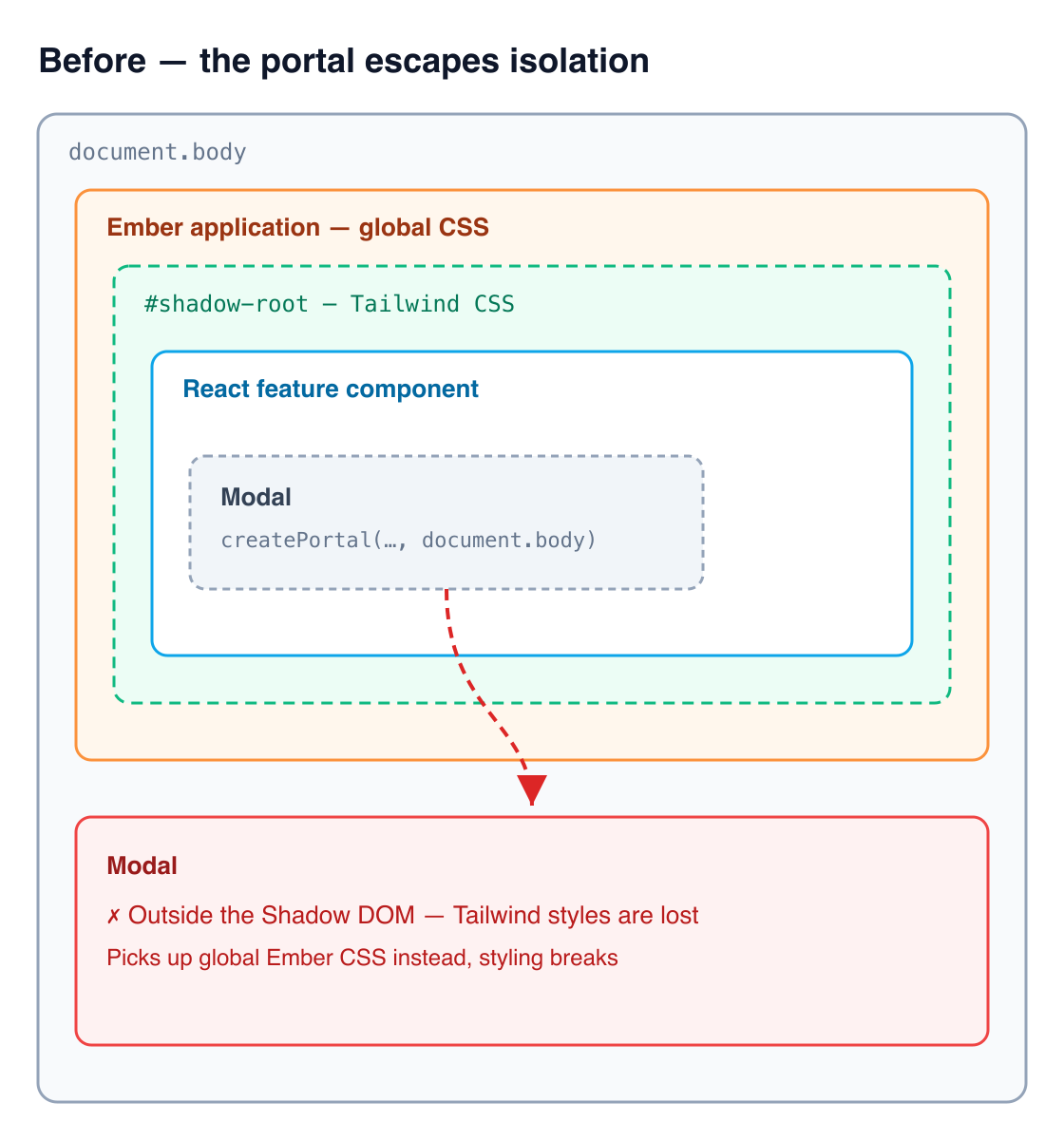
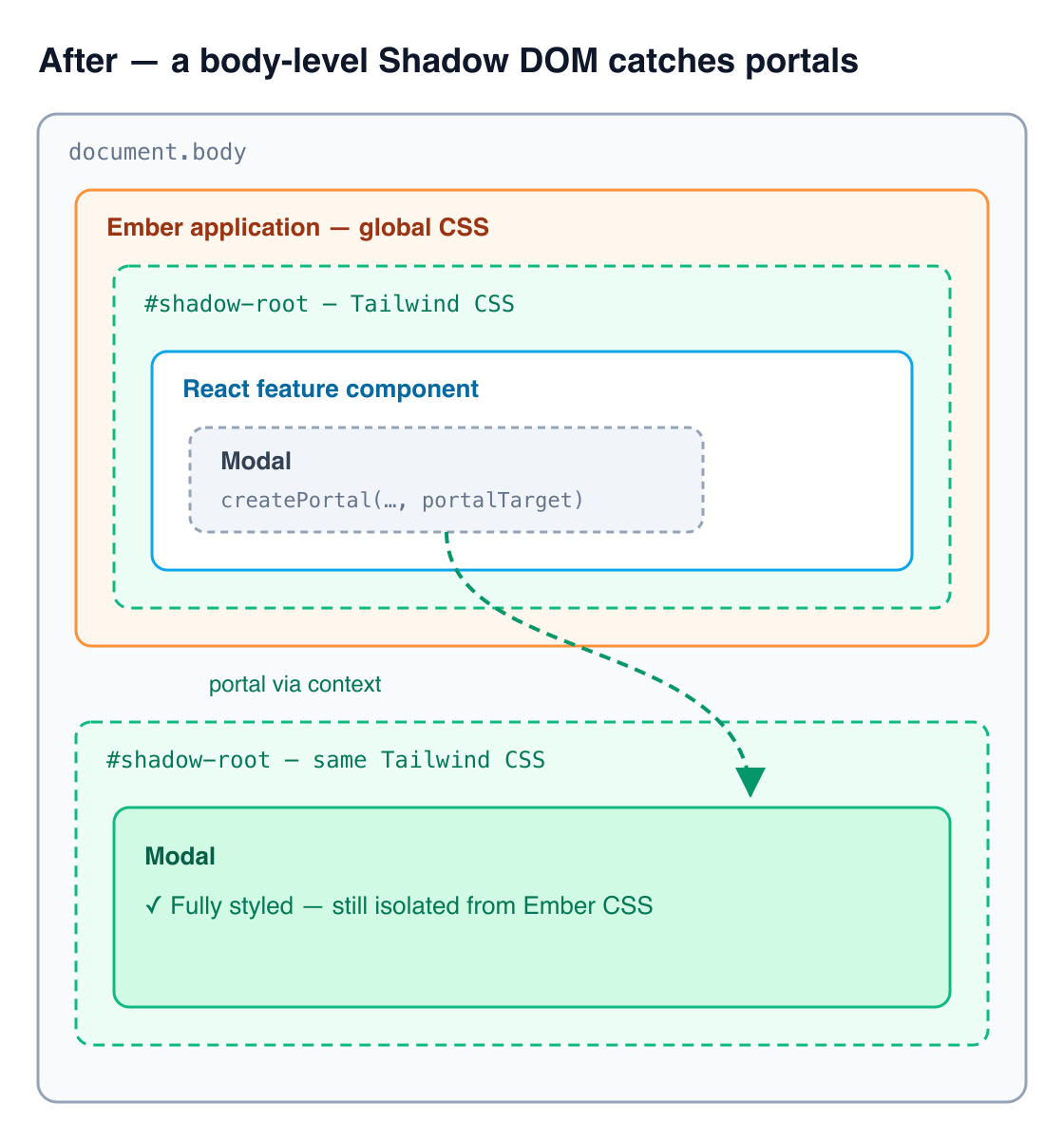
To solve this, we updated our UI component library so those components were Shadow DOM-aware. We exposed a React Context that holds an optional HTML element and when present, those components portal to the provided element, falling back to the body otherwise.
export function usePortalTarget(): HTMLElement {
  return useContext(PortalTargetContext) ?? document.body;
}

export function Modal({ children }: { children: ReactNode }) {
  return createPortal(children, usePortalTarget());
}
Then in our React repo, the base component renders a second Shadow DOM with the same styles at the body level and sets the context to that Shadow DOM'd element. The result is that all of our UI components that use portals portal into the body-level Shadow DOM and render correctly. This all happens seamlessly: you continue to use those components just like you would use them anywhere else and they just work.
import root from 'react-shadow';
import styles from './compiled-tailwind.css?inline';

const stylesheet = new CSSStyleSheet();
void stylesheet.replace(styles);

export function ShadowContainer({ children }: { children: ReactNode }) {
  const [portalTarget, setPortalTarget] = useState<HTMLElement>();

  return (
    <>
      {createPortal(
        <root.div mode="open" styleSheets={[stylesheet]}>
          <div ref={(el) => setPortalTarget(el ?? undefined)} />
        </root.div>,
        document.body,
      )}
      <root.div mode="open" styleSheets={[stylesheet]}>
        <PortalTargetProvider target={portalTarget}>{children}</PortalTargetProvider>
      </root.div>
    </>
  );
}
The insight
So now we have a fully functional end-to-end development process that allows seamless development of features in React that we can natively render in Ember. With so little friction, it's now extremely easy for an Envoy developer to take a feature and choose to develop it in React. This lets us apply the Strangler Pattern and move to a React-first world within the company, all while being essentially invisible to the actual users of our dashboard. This project embodies Envoy's engineering culture: we could have settled for something that worked okay, but instead we hunted for a better technical solution so we didn't have to compromise on delivering a great experience to users.
Takeaways
- Challenge the status quo. When this project first started, people were skeptical. Some people were comfortable with Ember, some didn't think it could work. Now that the project is finished, we have multiple teams using this system and we're writing more React than ever before. This is our new status quo, for now, until another Envoy engineer decides to challenge it and keep improving our development lifecycle.
- Always keep your objectives and outcome in mind when evaluating and making decisions. The value we're getting out of this new system is not React per se. It's improved velocity, quality and a better developer experience. Every decision, experiment and implementation in this journey was focused on maximizing these values.
- The technology matters but it's not the only thing that matters. The technological challenges in this project were really interesting to ponder and iterate on, but only to those actually working on it. Everyone else just wants to be able to deliver better quality features, faster, and you should always keep that in mind when building engineer-facing solutions.